> From: William Donzelli
> Can the DEC M8291 CR11/CM11 controller card work with a DEC branded
> Documation M600 reader as well as the M200?
Should do; the 'CR11/CM11 system manual' (DEC-11-HCRMA-C-D) mentions it,
although it doesn't provide extensive coverage.
I guess that version of the CR11 manual isn't available online; please let me
know if you need me to scan it.
Noel
Unfortunately I need to sell my VAX - an original 11/780, but with a
CSPI array processor hidden in a third matching DECcabinet. This was
used to control an xray crystallography machine years ago, so the VAX
itself is fairly minimal, but with quite a lot of number crunching
horsepower.
It has not been powered up in perhaps 15 years, but is in fantastic
condition. The only real flaw is that at one point some water dripped
on the top, so the blue paint marred in one spot. The easy way to take
care of that is to simply replace the sheet metal with a nice one from
another standard DEC cabinet. Or stack a few books on top!
I have tapes with the CSPI software (does Al need it?). Lots of DECdocs as well.
Throw me a number if you are interested. This is not a fire sale, so
be reasonable. I will work on getting some pictures. There are no
drives with this. I suppose eventually this will go on Ebay - but I
really hate Ebay at this point.
The only issue is that right now is not the time to move the beast.
Snow snow snow, and cleaning the dock is a big job, so shipping might
have to wait until spring.
--
Will, IBM land in the Hudson Valley
On 12/3/19 11:00 PM, Lamar Owen wrote:
>
>
> On Dec 3, 2019 8:55 PM, Bill Gunshannon via cctech
> <cctech at classiccmp.org> wrote:
>
> Especially RSX180 as I have some other plans for that one.
>
> RSX180?? Learn about something new everyday!? This tidbit alone was
> worth watching the thread.
>
Well, glad it helped. And here's more...
I have succeeded in getting RSX-180 installed on a hard disk.
In doing so I have learned some things that others might consider
valuable as well.
Disk sizes and formats are more important than one might realize
>from reading the support page.
Oversized hard disk partitions cause really strange behavior totally
unrelated to disk I/O. When I tried to use a disk partition that was
too big the system merely spewed garbage to the screen.
But the second lesson is even more important.
The Support Page states:
"For best performance format the floppy first under CP/M, so
the sectors will have the optimum interleave value for the
P112 hardware. Otherwise, disk accesses will be very slow."
This is not accurate. When I used a brand new pre-formatted floppy
without formatting it under CP/M it booted but many of the commands
failed to work and even th4e directory could not be seen. Formatting
on CP/M and then using rawrite to place the image on the floppy fixed
that.
I have been having a problem getting CP/M 3 to boot and now suspect
it may be the same problem. Again, I used a pre-formatted brand new
floppy and rawrite. When I try to boot it starts loading and then
spews what looks like random garbage to the screen. I am going to
try using a CP/M formatted floppy and I actually expect it will fix
the problem.
bill
Just in case someone else hasn't already responded, the P112 does not use DOS style fdisk partitioning for a hard disk. It is done in the BIOS image, and then the logical disks have to be initialized. This is described in the "P112 GIDE Construction.pdf" document.
I've only used 3.5" floppies, which work fine. You can also attach a PATA CD-ROM drive and access disks with a program that escapes my memory at the moment.
I am going through stuff in my office and found that I have some SCSI
device docs that aren't on bitsavers. As far as multi-page documents, it
seems as if my scanner (or its software) only does uncompressed TIFF. At
bitsaver's recommended 400 dpi, that means about 4M per page.
What should I do? Scan the docs in and find a tool to convert to
lossless compression. Scan the docs in and just submit the huge files?
Something else?
The docs that I have are copies, not originals. Does anyone here want
them after I scan them?
alan
> From: Guy Dunphy
> JBIG2 .. introduces so many actual factual errors (typically
> substituted letters and numbers)
It's probably worth noting that there are often errors _in the original
documents_, too - so even a perfect image doesn't guarantee no errors.
The most recent one (of many) which I found (although I only had a PDF to
work from, so maybe it's a 'scanning induced error') is described at the
bottom here:
https://gunkies.org/wiki/KS10
Although looking again at the PDF, the two digits in question are quite clear
and crisp, and don't seem like they could be scanning errors.
Noel
At 01:57 PM 2/12/2019 -0700, you wrote:
>On Tue, Nov 26, 2019 at 8:51 PM Jay Jaeger via cctalk <cctalk at classiccmp.org>
>wrote:
>
>> When I corresponded with Al Kossow about format several years ago, he
>> indicated that CCITT Group 4 lossless compression was their standard.
>>
>
>There are newer bilevel encodings that are somewhat more efficient than G4
>(ITU-T T.6), such as JBIG (T.82) and JBIG2 (T.88), but they are not as
>widely supported, and AFAIK JBIG2 is still patent encumbered. As a result,
>G4 is still arguably the best bilevel encoding for general-purpose use. PDF
>has natively supported G4 for ages, though it gained JBIG and JBIG2 support
>in more recent versions.
>
>Back in 2001, support for G4 encoding in open source software was really
>awful; where it existed at all, it was horribly slow. There was no good
>reason for G4 encoding to be slow, which was part of my motivation in
>writing my own G4 encoder for tumble (an image-to-PDF utility). However, G4
>support is generally much better now.
Mentioning JBIG2 (or any of its predecessors) without noting that it is
completely unacceptable as a scanned document compression scheme, demonstrates
a lack of awareness of the defects it introduces in encoded documents.
See http://everist.org/NobLog/20131122_an_actual_knob.htm#jbig2
JBIG2 typically produces visually appalling results, and also introduces so
many actual factual errors (typically substituted letters and numbers) that
documents encoded with it have been ruled inadmissible as evidence in court.
Sucks to be an engineering or financial institution, which scanned all its
archives with JBIG2 then shredded the paper originals to save space.
The fuzzyness of JBIG is adjustable, but fundamentally there will always
be some degree of visible patchyness and risk of incorrect substitution.
As for G4 bilevel encoding, the only reasons it isn't treated with the same
disdain as JBIG2, are:
1. Bandwaggon effect - "It must be OK because so many people use it."
2. People with little or zero awareness of typography, the visual quality of
text, and anything to do with preservation of historical character of
printed works. For them "I can read it OK" is the sole requirement.
G4 compression was invented for fax machines. No one cared much about visual
quality of faxes, they just had to be readable. Also the technology of fax
machines was only capable of two-tone B&W reproduction, so that's what G4
encoding provided.
Thinking these kinds of visual degradation of quality are acceptable when
scanning documents for long term preservation, is both short sighted and
ignorant of what can already be achieved with better technique.
For example, B&W text and line diagram material can be presented very nicely
using 16-level gray shading, That's enough to visually preserve all the
line and edge quality. The PNG compression scheme provides a color indexed
4 bits/pixel format, combining with PNG's run-length coding. When documents
are scanned with sensible thresholds plus post-processed to ensure all white
paper is actually #FFFFFF, and solid blacks are actually #0, but edges retain
adequate gray shading, PNG achieves an excellent level of filesize compression.
The visual results are _far_ superior to G4 and JBIG2 coding, and surprisingly
the file sizes can actually be smaller. It's easy to achieve on-screen results
that are visually indistinguishable from looking at the paper original, with
quite acceptable filesizes.
And that's the way it should be.
Which brings us to PDF, that most people love because they use it all the
time, never looked into the details of its internals, and can't imagine
anything better.
Just one point here. PDF does not support PNG image encoding. *All* the
image compression schemes PDF does support, are flawed in various cases.
But because PDF structuring is opaque to users, very few are aware of
this and its other problems. And therefore why PDF isn't acceptable as a
container for long term archiving of _scanned_ documents for historical
purposes. Even though PDF was at least extended to include an 'archival'
form in which all the font definitions must be included.
When I scan things I'm generally doing it in an experimental sense,
still exploring solutions to various issues such as the best way to deal
with screened print images and cases where ink screening for tonal images
has been overlaid with fine detail line art and text. Which makes processing
to a high quality digital image quite difficult.
But PDF literally cannot be used as a wrapper for the results, since
it doesn't incorporate the required image compression formats.
This is why I use things like html structuring, wrapped as either a zip
file or RARbook format. Because there is no other option at present.
There will be eventually. Just not yet. PDF has to be either greatly
extended, or replaced.
And that's why I get upset when people physically destroy rare old documents
during or after scanning them currently. It happens so frequently, that by
the time we have a technically adequate document coding scheme, a lot of old
documents won't have any surviving paper copies.
They'll be gone forever, with only really crap quality scans surviving.
Guy
I've just had the pleasure of taking a new machine into my collection, a Sol
20.
It's particularly interesting for several reasons. First, it was once in
the possession
of Jim Willing (zoom into the label next to the control key):
http://wsudbrink.dyndns.org:8080/images/fixed_sol/20191125_195224.jpg
For those that don't know, Jim was a very early collector of vintage
computers
and one of the first collectors to put up a web site with pictures of his
collection,
scans of documents and the like. Also, he was one of the first posters to
the
original classic computer mailing list:
http://ana-3.lcs.mit.edu/~jnc/cctalk/
That's the first old name.
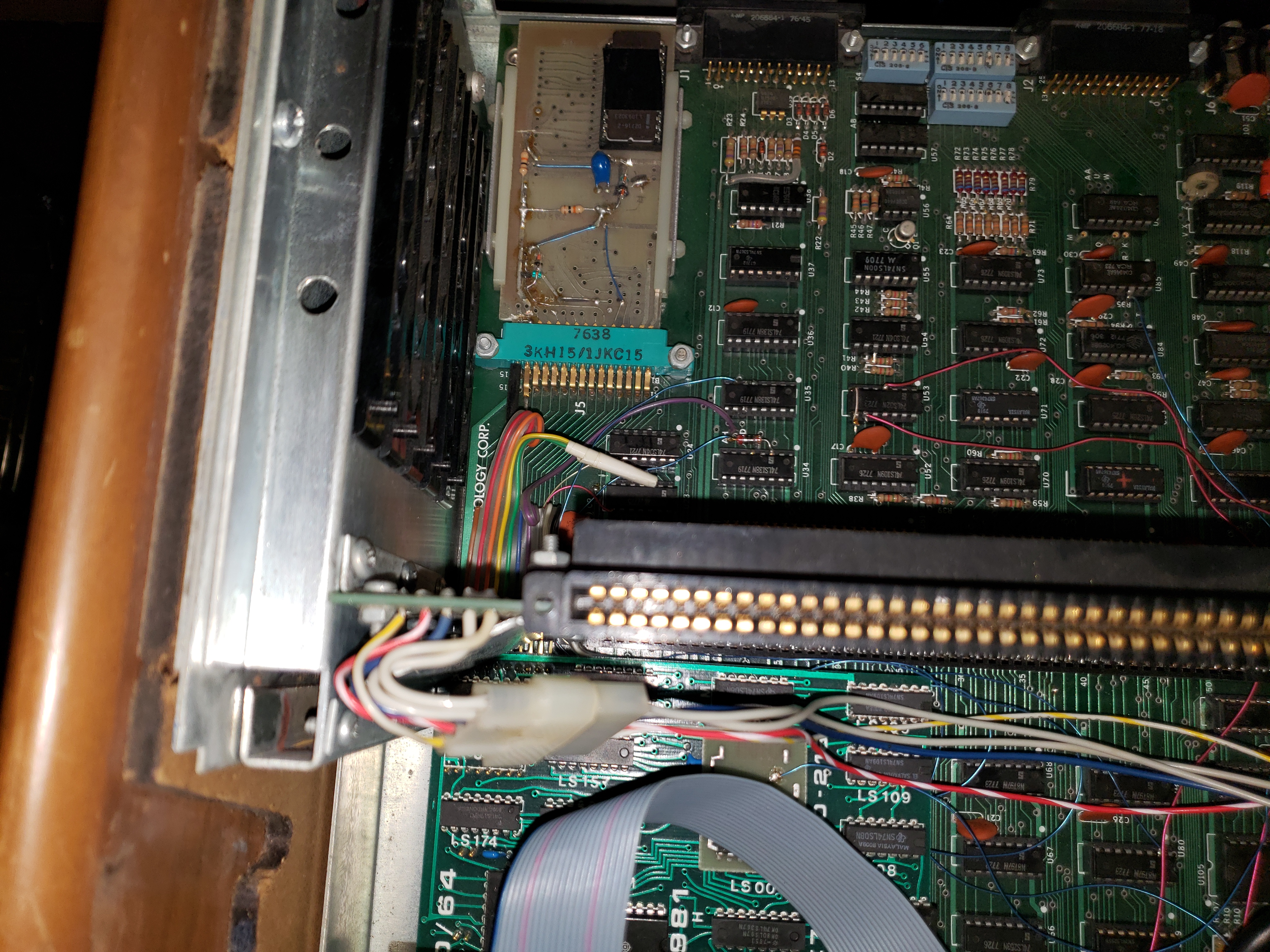
Other interesting things about the Sol include that it has an 80/64 video
modification
(with patches all over):
http://wsudbrink.dyndns.org:8080/images/fixed_sol/20191125_202606.jpg
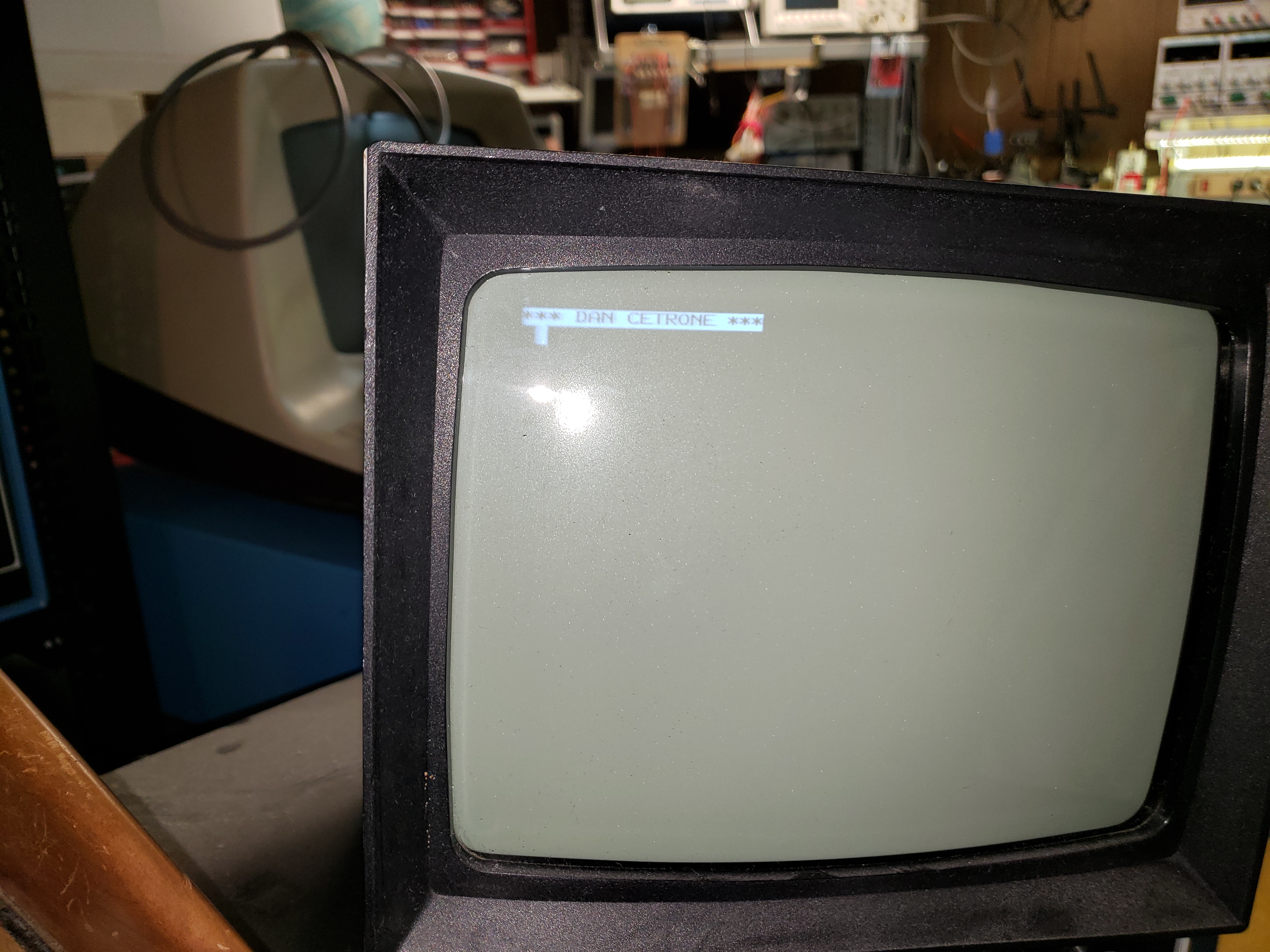
and a patched personality module socket with a custom ROM:
http://wsudbrink.dyndns.org:8080/images/fixed_sol/20191125_195249.jpg
which leads to the second old name. One that I don't know:
http://wsudbrink.dyndns.org:8080/images/fixed_sol/20191125_211019.jpg
Every time that the machine boots it displays that banner:
*** DAN CETRONE ***
I've done some googling but I can't find out anything about him. I've
started
to disassemble the contents of the ROM. There are some blocks that look
like
the Micro Complex ROM, but other sections don't match. I'll publish it when
I'm done. Anyway, I don't know if Dan was the author or just wanted to
uniquely
identify his Sol. If anyone knows, knew, knew about, Dan, I'd love to hear
about
it.
Thanks,
Bill Sudbrink
At 01:20 AM 3/12/2019 -0200, you wrote:
>I cannot understand your problems with PDF files.
>I've created lots and lots of PDFs, with treated and untreated scanned
>material. All of them are very readable and in use for years. Of course,
>garbage in, garbage out. I take the utmost care in my scans to have good
>enough source files, so I can create great PDFs.
>
>Of course, Guy's commens are very informative and I'll learn more from it.
>But I still believe in good preservation using PDF files. FOR ME it is the
>best we have in encapsulating info. Forget HTMLs.
I don't propose html as a viable alternative. It has massive inadequacies
for representing physical documents. I just use it for experimenting and
and as a temporary wrapper, because it's entirely transparent and maleable.
ie I have total control over the result (within the bounds of what html
can do.)
>Please, take a look at this PDF, and tell me: Isn't that good enough for
>preservation/use?
>https://drive.google.com/file/d/0B7yahi4JC3juSVVkOEhwRWdUR1E/view
OK, not too bad in comparison to many others. But a few comments:
* The images are fax-mode, and although the resolution is high enough for there to be
no ambiguities, it still looks bad and stylistically greatly differs from the original.
Pity I don't have a copy of the original, to make demonstration scans of a few
illustrations to show what it could be like, for similar file size.
* The text is OCR, with a font I expect likely approximates the original fairly well.
Though I'd like to see the original. I suspect the PDF font is a bit 'thic' due to
incorrect gray threshold.
Also it's searchable, except that the OCR process included paper blemishes as 'characters'
so if you copy-paste the text elsewhere you have to carefully vet it. And not all searches
will work.
This is an illustration of the point that till we achieve human-leval AI, it's never
going to be possible to go from images to abstracted OCR text automatically without considerable
human oversight and proof-reading. And... human-level AI won't _want_ to do drudgery like that.
* Your automated PDF generation process did a lot of silly things, like chaotic attempts to
OCR 'elements' of diagrams. Just try moving a text selection box over the diagrams, you'll
see what I mean. Try several diagrams, it's very random.
* The PCB layouts, for eg PDF page #s 28, 29 - I bet the original used light shading to represent
copper, and details over the copper were clearly visible. But when you scanned it in bi-level
all that is lost. These _have_ to be in gray scale, and preferably post-processed to posterize
the flat shading areas (for better compression as well as visual accuracy.)
* Why are all the diagram pages variously different widths? I expect the original pages (foldouts?)
had common sizes. This variation is because either you didn't use a fixed recipee for scanning
and processing, or your PDF generation utility 'handled' that automatically (and messed up.)
* You don't have control of what was OCR'd and what wasn't. For instance, why OCR table contents,
if the text selection results are garbage? For eg, select the entire block at the bottom of
PDF page 48. Does the highlighting create a sense of confidence this is going to work?
Now copy and paste into a text editor. Is the result useful? (No.)
OCR can be over-used.
* 'ownership' As well as your introduction page, you put your tag on every single page.
Pretty much everyone does something like this. As if by transcribing the source material you
acquired some kind of ownership or bragging rights. But no, others put a very great deal of
effort into creating that work, and you just made a digital copy. That the originators probably
would consider an aesthetic insult to their efforts. So, why the proud tags everywhere?
Summary: It's fine as a working copy for practical use. Better to have made it than not, so long
as you didn't destroy the paper original in the process. But if you're talking about an archival
historical record, that someone can look at in 500 years (or 5000) and know what the original
actually looked like, how much effort went into making that ink crisp and accurate, then no.
It's not good enough.
To be fair, I've never yet seen any PDF scan of any document that I'd consider good enough.
Works created originally in PDF as line art are a different class, and typically OK. Though
some other flaws of PDF do come into play. Difficulty of content export, problems with global
page parameters, font failures, sequential vs content page numbers, etc.
With scanning there are multiple points of failure right through the whole process at present,
ranging from misunderstandings of the technology among people doing scanning, problems with
scanners (why are edge scanners so rare!?), lack of critical capabilities in post-processing
utilities (line art on top of ink screening, it's a nightmare, also most people can't use
Photoshop well, and it's necessary), failings built unavoidably into PDF, and not so great
PDF viewer utilities. Apart from the intrinsic issues (aside from a few advantages) with
on-screen display and controls compared to paper.
I hope I have not offended you. Btw my pickiness comes from growing up in a family with
commercial art, typography, printing and technical art involvement. And having in later years
assisted a little with such things. So at least I know how much effort goes into such things.
Keep the original. Methods and utilities will improve, and in 10 or 20 years it may be possible
to make a visually perfect digital copy (with minimal effort), worthy of becoming a sole record
of that thing (if history goes that way.)
Guy