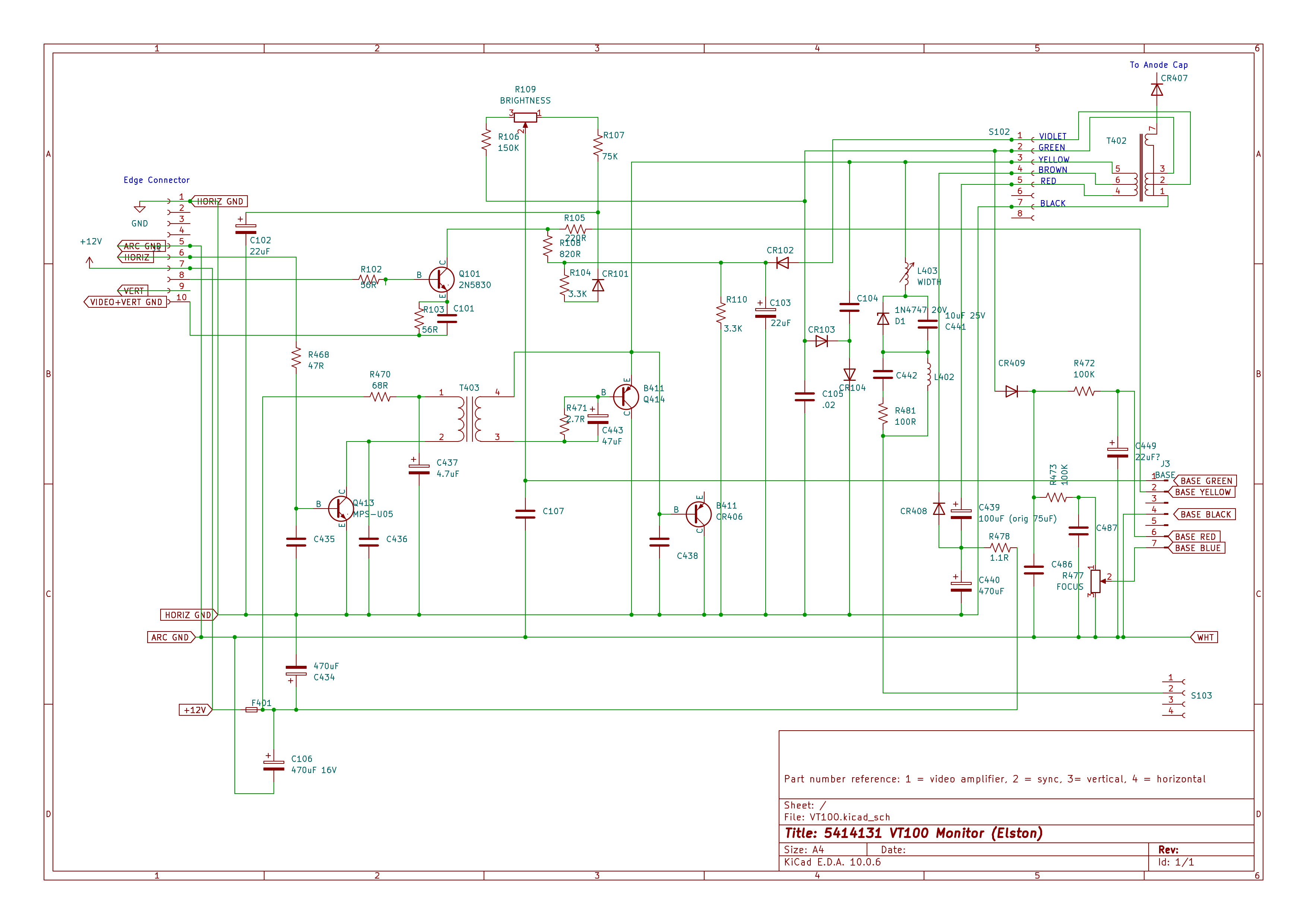
Some time ago I posted asking for help with my VT100 monitor board and
flyback. This is the monitor board that uses Germanium transistors and
for which there is no known printset available. The conclusion was that
the flyback had failed, proved by the burning smell and poor ring test
results, and described at greater length here;
https://robs-old-computers.com/2026/03/30/vt100-video-display-failed-flybac….
I have managed to get a NOS replacement flyback. The ring test shows
that it is good. However, I have enough suspicions about the two
Germanium transistors (Q414 and CR406) that I don't want to just slap it
in and hope it works, especially as I have little chance of ever finding
another flyback. The primary coil of the flyback, driven by these two
transistors, is the one that is shorted in the bad flyback and I don't
know if the flyback failed because of these transistors or not.
Are there any tests I could do on the monitor board prior to fitting the
new flyback? Could I source any kind of modern inductor to act as a
sacrificial part that would be enough to prove correct operation?
I have updated my own reverse engineered schematic
here: https://robs-old-computers.com/wp-content/uploads/2026/09/5414131-partial-s….
This is from a KiCad 10 schematic and I can of course supply that if it
would help.
Thanks
Rob
POWER ON 2026 is officially live!
Every year, the Large Scale Systems Museum asks our community to help keep
computer history alive. This year, we're doing it with our POWER ON
fundraiser.
Your support helps us preserve, maintain, and share our collection of
working historic computer systems and continue making the museum available
to the public.
We've also created some special supporter rewards this year, including our
limited-edition LSSM 11th Anniversary Coin.
There are several ways to support POWER ON 2026, from $32 all the way up to
$2,048.
See all the supporter levels and rewards here:
https://lssmuseum.square.site/s/order?cs=true&cst=custom...
<https://lssmuseum.square.site/s/order?cs=true&cst=custom&item=ZVRQRT72ES3KO…>
We, the volunteers who work on the restoration of these machines, thank you.
Does anyone have one (or know where I can get one) of the 80 pin high
density cables that connects the 16500B main board to the 16500-68733
(16500L or 16500H) LAN/High Speed interface board.
The cable part # is 16500-61607or 16500-61608.
Please contact me off list at bitwiz(a)12bitsbest.com
Thank you,
Mike
Is this email still active?
I found an old old (2016) post about various vintage computers for sale.
I found it specifically looking for a Poly88 - my "white whale".
While I'm sure that one got sold, if you're still active, and you have
any leads on a Poly88, please let me know!
Thanks,
Andrew Pullin
Hi everyone,
I may have asked this before, I can't remember...
I have a PDP-11/23+ pieced together on an H9276 backplane, sitting on the
floor. I have rigged
some fans to keep it cool, but I would love to have either a complete
BA11-S box, or the H9276-B
cardcage for it. The cardcage doesn't have to have the backplane since I
already have one.
Does anyone have either of these that they'd be willing to part with?
I am located in the US.
- Peter
As far as the Poly 88 is concerned, I probably have at least 3 in
various states "buried" someplace. I sold the most complete one some
number of years ago.
Along a similar vein, I probably have the worlds largest collection of
remaining original Poly docs (a three drawer file cabinet) all organized
by part number I obtained after Poly closed their doors. Note again,
they are organized by part number rather than description. If anyone
needs copies of the docs, let me know the part number, and I can check
to see if I have them. Additionally, I have a bunch (100?) of partly
build S100 cards. I took some of them to VCFMW a number of years ago,
but there was little interest in them.
Marvin, KE6HTS
On 9/24/2026 10:00 AM, cctalk-request(a)classiccmp.org wrote:
> Message: 8
> Date: Wed, 23 Sep 2026 21:10:27 -0700
> From: Andrew Pullin<pullin(a)berkeley.edu>
> Subject: [cctalk] Re: Computer for sale
> To:cctech@classiccmp.org
> Message-ID:<7e84838a-78f1-4592-965d-9e2a2742dd23(a)berkeley.edu>
> Content-Type: text/plain; charset=UTF-8; format=flowed
>
> Is this email still active?
>
> I found an old old (2016) post about various vintage computers for sale.
> I found it specifically looking for a Poly88 - my "white whale".
>
> While I'm sure that one got sold, if you're still active, and you have
> any leads on a Poly88, please let me know!
>
> Thanks,
> Andrew Pullin
I hope everyone had a good time at VCF Midwest last weekend.
The next meeting in Glen Ellyn of the CCC Hardware Repair and Discussion
will be held on October 17, 2026.
Meeting Starts at 2:00PM and we will order pizza around 6pm or so.
I hope to see you there,
Mike Katz
385 Saint Charles Rd
Glen Ellyn, IL 60137
+1 (773) 414-1044 (Cell)
Hey, just an FYI, Devin D. <damicomainframe(a)gmail.com> has
spoken for this, and I'll be sending to him in Florida.
> I have a working VT510 if anyone would like it, I'd like to give it to a
> good home. This is the one that uses a PS2 style connector for a
> standard AT keyboard to be plugged into, and operates with RS232. I've
> just used it as a console on a fun project the last few years on and off.
>
> Just send me your address, and it's yours , you don't even need to pay
> for shipping , as long as it is continental united states.
--